03 粮仓补给站 - 镜像源与软件安装
什么是软件仓库
软件仓库是存放软件的服务器或者网站,包含了软件包及索引文件。用户可通过包管理工具,便捷地进行 Linux 系统内的软件安装、卸载和更新。
- 软件仓库 - Linux 系统
- 应用商店 - 安卓系统
- App Store - iOS 系统
软件仓库之于 Linux 系统,类似应用商店之于安卓系统,恰如 App Store 之于 iOS 系统
包管理工具
不同的 Linux 发行版有不同的包管理工具。
dpkg 适用于 Ubuntu 和 Debian
bash
# 安装 package.deb 软件包
dpkg -i package.deb

# 卸载 package 软件
dpkg -r packageapt 适用于 Ubuntu 和 Debian
bash
# 安装 package 软件包
apt-get install package

# 卸载 package 软件
apt-get remove packagerpm 适用于 RHEL、CentOS
bash
#安装 package.rpm 软件包
rpm -ivh package.rpm

#卸载 package 软件
rpm -e packageyum 适用于 CentOS 6-8
bash
# 安装 package 软件包
yum install package

# 卸载 package 软件
yum remove packagednf 适用于 RHEL8、CentOS8
bash
# 安装 package 软件包
dnf install package

# 卸载 package 软件
dnf remove packageLinux 系统软件安装
软件仓库原理
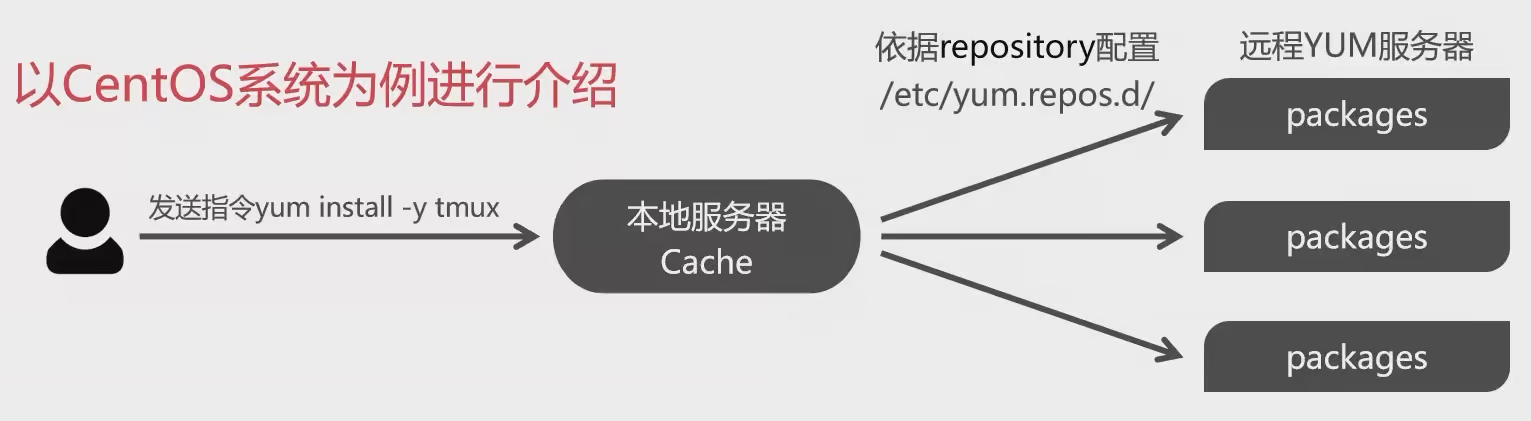
- 用户发送 yum 安装指令后,首先会在本地服务器上进行查找,如果有对应的安装包且所需的依赖文件均存在,则进行安装;
- 若不存在所需的安装包文件,则根据 yum repository 信息在远程 yum 服务器上进行下载该软件包及其依赖后安装;
- 若远程 yum 服务器无所需的安装包,则提示无该软件。
RPM 与软件仓库的作用
- RPM 是通过将源代码与安装规则打包在一起,降低了单个软件的安装难度。
- 而 Yum 与 DNF 软件仓库则是将大量常用的 RPM 软件包打包到一起,解决了软件包之间的依赖关系,这进一步降低了软件的整体安装难度。
常用的 RPM 软件包命令
| 常用命令搭配 | 功能作用 |
|---|---|
rpm -ivh filename.rpm | 安装软件 |
rpm -Uvh filename.rpm | 升级软件 |
rpm -e filename.rpm | 卸载软件 |
rpm -qpi filename.rpm | 查询软件描述信息 |
rpm -qpl filename.rpm | 查询软件文件信息 |
rpm -qc filename | 查询软件配置文件 |
rpm -qR filename | 查询软件依赖关系 |
rpm -qf filename | 查询文件属于哪个 RPM |
rpm -V filename | 验证软件包是否被修改 |
rpm -qa | 查询所有已安装的软件 |
常见的 Yum 命令
| 命令 | 作用 |
|---|---|
yum repolist all | 列出所有仓库 |
yum list all | 列出仓库中所有软件包 |
yum info 软件包名称 | 查看软件包信息 |
yum install 软件包名称 | 安装软件包 |
yum reinstall 软件包名称 | 重新安装软件包 |
yum update 软件包名称 | 升级软件包 |
yum remove 软件包名称 | 移除软件包 |
yum clean all | 清除所有仓库缓存 |
yum check-update | 检查可更新的软件包 |
yum grouplist | 查看系统中已经安装的软件包组 |
yum groupinstall 软件包组 | 安装指定的软件包组 |
yum groupremove 软件包组 | 移除指定的软件包组 |
yum groupinfo 软件包组 | 查询指定的软件包组信息 |
CentOS 安装 tmux
bash
yum install tmux # 安装 tmux 软件,需进一步确认
yum install tmux -y # 确认安装 tmux 软件
yum list installed # 查看已安装的所有软件包
yum remove tmux # 卸载 tmux 软件,需进一步确认
yum remove tmux -y # 确认卸载 tmux 软件
yum provides tmux # 检索提供 tmux 指令的软件包
yum search tmux # 查找名称及其简介中包含 tmux 信息的软件包注意
不同的 Linux 发行版进行软件安装需要用到不同的指令,请根据实际使用的 Linux 发行版选择合适的指令。
镜像源
以 CentOS 为例,默认软件仓库配置为:
bash
➜  ~ cat /etc/yum.repos.d/CentOS-Stream-AppStream.repo
# CentOS-Stream-AppStream.repo
#
# The mirrorlist system uses the connecting IP address of the client and the
# update status of each mirror to pick current mirrors that are geographically
# close to the client.  You should use this for CentOS updates unless you are
# manually picking other mirrors.
#
# If the mirrorlist does not work for you, you can try the commented out
# baseurl line instead.

[appstream]
name=CentOS Stream $releasever - AppStream
#mirrorlist=http://mirrorlist.centos.org/?release=$stream&arch=$basearch&repo=AppStream&infra=$infra
baseurl=http://mirrors.tencentyun.com/$contentdir/$stream/AppStream/$basearch/os/
gpgcheck=1
enabled=1
gpgkey=file:///etc/pki/rpm-gpg/RPM-GPG-KEY-centosofficial
exclude=cloud-init

➜  ~ cat /etc/yum.repos.d/CentOS-Stream-BaseOS.repo
# CentOS-Stream-BaseOS.repo
#
# The mirrorlist system uses the connecting IP address of the client and the
# update status of each mirror to pick current mirrors that are geographically
# close to the client.  You should use this for CentOS updates unless you are
# manually picking other mirrors.
#
# If the mirrorlist does not work for you, you can try the commented out
# baseurl line instead.

[baseos]
name=CentOS Stream $releasever - BaseOS
#mirrorlist=http://mirrorlist.centos.org/?release=$stream&arch=$basearch&repo=BaseOS&infra=$infra
baseurl=http://mirrors.tencentyun.com/$contentdir/$stream/BaseOS/$basearch/os/
gpgcheck=1
enabled=1
gpgkey=file:///etc/pki/rpm-gpg/RPM-GPG-KEY-centosofficial即首先需要访问 mirrorlist.centos.org 网站并解析镜像仓库,则意味着每次下载程序需要绕大半个地球,如果国内有一个软件仓库,定期与国际主流的软件仓库同步,则可以大大提高下载速度。
- 清华大学镜像源 - https://mirrors.tuna.tsinghua.edu.cn/help/centos/
- 阿里云镜像源 - https://developer.aliyun.com/mirror
- 腾讯云镜像源 - http://mirrors.tencent.com/
- 华为云镜像源 - https://mirrors.huaweicloud.com/
- 校园网联合镜像 - https://mirrors.cernet.edu.cn/
使用国内镜像源
bash
cat <<'EOF' > /tmp/update_mirror.pl
#!/usr/bin/perl

use strict;
use warnings;
use autodie;

my $mirrors = 'https://mirrors.tuna.tsinghua.edu.cn/centos-stream';

if (@ARGV < 1) {
    die "Usage: $0 <filename1> <filename2> ...\n";
}

while (my $filename = shift @ARGV) {
    my $backup_filename = $filename . '.bak';
    rename $filename, $backup_filename;

    open my $input, "<", $backup_filename;
    open my $output, ">", $filename;

    while (<$input>) {
        s/^metalink/# metalink/;

        if (m/^name/) {
            my (undef, $repo, $arch) = split /-/;
            $repo =~ s/^\s+|\s+$//g;
            ($arch = defined $arch ? lc($arch) : '') =~ s/^\s+|\s+$//g;

            if ($repo =~ /^Extras/) {
                $_ .= "baseurl=${mirrors}/SIGs/\$releasever-stream/extras" . ($arch eq 'source' ? "/${arch}/" : "/\$basearch/") . "extras-common\n";
            } else {
                $_ .= "baseurl=${mirrors}/\$releasever-stream/$repo" . ($arch eq 'source' ? "/" : "/\$basearch/") . ($arch ne '' ? "${arch}/tree/" : "os") . "\n";
            }
        }

        print $output $_;
    }
}
EOF在命令行中使用以下命令来执行它:
bash
sudo perl /tmp/update_mirror.pl /etc/yum.repos.d/centos*.repo注意将 /tmp/update_mirror.pl 替换为脚本实际保存的路径。其中的 * 通配符,如果只需要替换一些文件中的源,请自行增删。
另外,请确保已经安装了 Perl 解释器,并将 perl 命令添加到系统的 PATH 环境变量中。这样才能在命令行中运行 Perl 脚本。
对于大部分 CentOS Stream 9 镜像,应该已经包含了 Perl 解释器,如果你的镜像没有包含,你可以使用以下命令简单的安装:
bash
# 使用 dnf
sudo dnf install perl

# 使用 yum
sudo yum install perl最后,更新软件包缓存
bash
# 使用 dnf
sudo dnf clean all && sudo dnf makecache

# 使用 yum
sudo yum clean all && sudo yum makecache修改结果
centos.repo
bash
cat <<'EOF' > /etc/yum.repos.d/centos.repo
[baseos]
name=CentOS Stream $releasever - BaseOS
baseurl=https://mirrors.tuna.tsinghua.edu.cn/centos-stream/$releasever-stream/BaseOS/$basearch/os
# metalink=https://mirrors.centos.org/metalink?repo=centos-baseos-$stream&arch=$basearch&protocol=https,http
gpgkey=file:///etc/pki/rpm-gpg/RPM-GPG-KEY-centosofficial
gpgcheck=1
repo_gpgcheck=0
metadata_expire=6h
countme=1
enabled=1

[baseos-debuginfo]
name=CentOS Stream $releasever - BaseOS - Debug
baseurl=https://mirrors.tuna.tsinghua.edu.cn/centos-stream/$releasever-stream/BaseOS/$basearch/debug/tree/
# metalink=https://mirrors.centos.org/metalink?repo=centos-baseos-debug-$stream&arch=$basearch&protocol=https,http
gpgkey=file:///etc/pki/rpm-gpg/RPM-GPG-KEY-centosofficial
gpgcheck=1
repo_gpgcheck=0
metadata_expire=6h
enabled=0

[baseos-source]
name=CentOS Stream $releasever - BaseOS - Source
baseurl=https://mirrors.tuna.tsinghua.edu.cn/centos-stream/$releasever-stream/BaseOS/source/tree/
# metalink=https://mirrors.centos.org/metalink?repo=centos-baseos-source-$stream&arch=source&protocol=https,http
gpgkey=file:///etc/pki/rpm-gpg/RPM-GPG-KEY-centosofficial
gpgcheck=1
repo_gpgcheck=0
metadata_expire=6h
enabled=0

[appstream]
name=CentOS Stream $releasever - AppStream
baseurl=https://mirrors.tuna.tsinghua.edu.cn/centos-stream/$releasever-stream/AppStream/$basearch/os
# metalink=https://mirrors.centos.org/metalink?repo=centos-appstream-$stream&arch=$basearch&protocol=https,http
gpgkey=file:///etc/pki/rpm-gpg/RPM-GPG-KEY-centosofficial
gpgcheck=1
repo_gpgcheck=0
metadata_expire=6h
countme=1
enabled=1

[appstream-debuginfo]
name=CentOS Stream $releasever - AppStream - Debug
baseurl=https://mirrors.tuna.tsinghua.edu.cn/centos-stream/$releasever-stream/AppStream/$basearch/debug/tree/
# metalink=https://mirrors.centos.org/metalink?repo=centos-appstream-debug-$stream&arch=$basearch&protocol=https,http
gpgkey=file:///etc/pki/rpm-gpg/RPM-GPG-KEY-centosofficial
gpgcheck=1
repo_gpgcheck=0
metadata_expire=6h
enabled=0

[appstream-source]
name=CentOS Stream $releasever - AppStream - Source
baseurl=https://mirrors.tuna.tsinghua.edu.cn/centos-stream/$releasever-stream/AppStream/source/tree/
# metalink=https://mirrors.centos.org/metalink?repo=centos-appstream-source-$stream&arch=source&protocol=https,http
gpgkey=file:///etc/pki/rpm-gpg/RPM-GPG-KEY-centosofficial
gpgcheck=1
repo_gpgcheck=0
metadata_expire=6h
enabled=0

[crb]
name=CentOS Stream $releasever - CRB
baseurl=https://mirrors.tuna.tsinghua.edu.cn/centos-stream/$releasever-stream/CRB/$basearch/os
# metalink=https://mirrors.centos.org/metalink?repo=centos-crb-$stream&arch=$basearch&protocol=https,http
gpgkey=file:///etc/pki/rpm-gpg/RPM-GPG-KEY-centosofficial
gpgcheck=1
repo_gpgcheck=0
metadata_expire=6h
countme=1
enabled=1

[crb-debuginfo]
name=CentOS Stream $releasever - CRB - Debug
baseurl=https://mirrors.tuna.tsinghua.edu.cn/centos-stream/$releasever-stream/CRB/$basearch/debug/tree/
# metalink=https://mirrors.centos.org/metalink?repo=centos-crb-debug-$stream&arch=$basearch&protocol=https,http
gpgkey=file:///etc/pki/rpm-gpg/RPM-GPG-KEY-centosofficial
gpgcheck=1
repo_gpgcheck=0
metadata_expire=6h
enabled=0

[crb-source]
name=CentOS Stream $releasever - CRB - Source
baseurl=https://mirrors.tuna.tsinghua.edu.cn/centos-stream/$releasever-stream/CRB/source/tree/
# metalink=https://mirrors.centos.org/metalink?repo=centos-crb-source-$stream&arch=source&protocol=https,http
gpgkey=file:///etc/pki/rpm-gpg/RPM-GPG-KEY-centosofficial
gpgcheck=1
repo_gpgcheck=0
metadata_expire=6h
enabled=0
EOFcentos-addons.repo
bash
cat <<'EOF' > /etc/yum.repos.d/centos-addons.repo
[highavailability]
name=CentOS Stream $releasever - HighAvailability
baseurl=https://mirrors.tuna.tsinghua.edu.cn/centos-stream/$releasever-stream/HighAvailability/$basearch/os
# metalink=https://mirrors.centos.org/metalink?repo=centos-highavailability-$stream&arch=$basearch&protocol=https,http
gpgkey=file:///etc/pki/rpm-gpg/RPM-GPG-KEY-centosofficial
gpgcheck=1
repo_gpgcheck=0
metadata_expire=6h
countme=1
enabled=0

[highavailability-debuginfo]
name=CentOS Stream $releasever - HighAvailability - Debug
baseurl=https://mirrors.tuna.tsinghua.edu.cn/centos-stream/$releasever-stream/HighAvailability/$basearch/debug/tree/
# metalink=https://mirrors.centos.org/metalink?repo=centos-highavailability-debug-$stream&arch=$basearch&protocol=https,http
gpgkey=file:///etc/pki/rpm-gpg/RPM-GPG-KEY-centosofficial
gpgcheck=1
repo_gpgcheck=0
metadata_expire=6h
enabled=0

[highavailability-source]
name=CentOS Stream $releasever - HighAvailability - Source
baseurl=https://mirrors.tuna.tsinghua.edu.cn/centos-stream/$releasever-stream/HighAvailability/source/tree/
# metalink=https://mirrors.centos.org/metalink?repo=centos-highavailability-source-$stream&arch=source&protocol=https,http
gpgkey=file:///etc/pki/rpm-gpg/RPM-GPG-KEY-centosofficial
gpgcheck=1
repo_gpgcheck=0
metadata_expire=6h
enabled=0

[nfv]
name=CentOS Stream $releasever - NFV
baseurl=https://mirrors.tuna.tsinghua.edu.cn/centos-stream/$releasever-stream/NFV/$basearch/os
# metalink=https://mirrors.centos.org/metalink?repo=centos-nfv-$stream&arch=$basearch&protocol=https,http
gpgkey=file:///etc/pki/rpm-gpg/RPM-GPG-KEY-centosofficial
gpgcheck=1
repo_gpgcheck=0
metadata_expire=6h
countme=1
enabled=0

[nfv-debuginfo]
name=CentOS Stream $releasever - NFV - Debug
baseurl=https://mirrors.tuna.tsinghua.edu.cn/centos-stream/$releasever-stream/NFV/$basearch/debug/tree/
# metalink=https://mirrors.centos.org/metalink?repo=centos-nfv-debug-$stream&arch=$basearch&protocol=https,http
gpgkey=file:///etc/pki/rpm-gpg/RPM-GPG-KEY-centosofficial
gpgcheck=1
repo_gpgcheck=0
metadata_expire=6h
enabled=0

[nfv-source]
name=CentOS Stream $releasever - NFV - Source
baseurl=https://mirrors.tuna.tsinghua.edu.cn/centos-stream/$releasever-stream/NFV/source/tree/
# metalink=https://mirrors.centos.org/metalink?repo=centos-nfv-source-$stream&arch=source&protocol=https,http
gpgkey=file:///etc/pki/rpm-gpg/RPM-GPG-KEY-centosofficial
gpgcheck=1
repo_gpgcheck=0
metadata_expire=6h
enabled=0

[rt]
name=CentOS Stream $releasever - RT
baseurl=https://mirrors.tuna.tsinghua.edu.cn/centos-stream/$releasever-stream/RT/$basearch/os
# metalink=https://mirrors.centos.org/metalink?repo=centos-rt-$stream&arch=$basearch&protocol=https,http
gpgkey=file:///etc/pki/rpm-gpg/RPM-GPG-KEY-centosofficial
gpgcheck=1
repo_gpgcheck=0
metadata_expire=6h
countme=1
enabled=0

[rt-debuginfo]
name=CentOS Stream $releasever - RT - Debug
baseurl=https://mirrors.tuna.tsinghua.edu.cn/centos-stream/$releasever-stream/RT/$basearch/debug/tree/
# metalink=https://mirrors.centos.org/metalink?repo=centos-rt-debug-$stream&arch=$basearch&protocol=https,http
gpgkey=file:///etc/pki/rpm-gpg/RPM-GPG-KEY-centosofficial
gpgcheck=1
repo_gpgcheck=0
metadata_expire=6h
enabled=0

[rt-source]
name=CentOS Stream $releasever - RT - Source
baseurl=https://mirrors.tuna.tsinghua.edu.cn/centos-stream/$releasever-stream/RT/source/tree/
# metalink=https://mirrors.centos.org/metalink?repo=centos-rt-source-$stream&arch=source&protocol=https,http
gpgkey=file:///etc/pki/rpm-gpg/RPM-GPG-KEY-centosofficial
gpgcheck=1
repo_gpgcheck=0
metadata_expire=6h
enabled=0

[resilientstorage]
name=CentOS Stream $releasever - ResilientStorage
baseurl=https://mirrors.tuna.tsinghua.edu.cn/centos-stream/$releasever-stream/ResilientStorage/$basearch/os
# metalink=https://mirrors.centos.org/metalink?repo=centos-resilientstorage-$stream&arch=$basearch&protocol=https,http
gpgkey=file:///etc/pki/rpm-gpg/RPM-GPG-KEY-centosofficial
gpgcheck=1
repo_gpgcheck=0
metadata_expire=6h
countme=1
enabled=0

[resilientstorage-debuginfo]
name=CentOS Stream $releasever - ResilientStorage - Debug
baseurl=https://mirrors.tuna.tsinghua.edu.cn/centos-stream/$releasever-stream/ResilientStorage/$basearch/debug/tree/
# metalink=https://mirrors.centos.org/metalink?repo=centos-resilientstorage-debug-$stream&arch=$basearch&protocol=https,http
gpgkey=file:///etc/pki/rpm-gpg/RPM-GPG-KEY-centosofficial
gpgcheck=1
repo_gpgcheck=0
metadata_expire=6h
enabled=0

[resilientstorage-source]
name=CentOS Stream $releasever - ResilientStorage - Source
baseurl=https://mirrors.tuna.tsinghua.edu.cn/centos-stream/$releasever-stream/ResilientStorage/source/tree/
# metalink=https://mirrors.centos.org/metalink?repo=centos-resilientstorage-source-$stream&arch=source&protocol=https,http
gpgkey=file:///etc/pki/rpm-gpg/RPM-GPG-KEY-centosofficial
gpgcheck=1
repo_gpgcheck=0
metadata_expire=6h
enabled=0

[extras-common]
name=CentOS Stream $releasever - Extras packages
baseurl=https://mirrors.tuna.tsinghua.edu.cn/centos-stream/SIGs/$releasever-stream/extras/$basearch/extras-common
# metalink=https://mirrors.centos.org/metalink?repo=centos-extras-sig-extras-common-$stream&arch=$basearch&protocol=https,http
gpgkey=file:///etc/pki/rpm-gpg/RPM-GPG-KEY-CentOS-SIG-Extras-SHA512
gpgcheck=1
repo_gpgcheck=0
metadata_expire=6h
countme=1
enabled=1

[extras-common-source]
name=CentOS Stream $releasever - Extras packages - Source
baseurl=https://mirrors.tuna.tsinghua.edu.cn/centos-stream/SIGs/$releasever-stream/extras/source/extras-common
# metalink=https://mirrors.centos.org/metalink?repo=centos-extras-sig-extras-common-source-$stream&arch=source&protocol=https,http
gpgkey=file:///etc/pki/rpm-gpg/RPM-GPG-KEY-CentOS-SIG-Extras-SHA512
gpgcheck=1
repo_gpgcheck=0
metadata_expire=6h
enabled=0
EOF